Buckets & access keys
Create buckets and issue S3 access keys from the panel. No Garage CLI, no config files — buktio talks to the engine over its network APIs.
buktio is a web panel, REST API, and CLI for S3-compatible object storage. Create buckets, issue access keys, browse objects, set CORS and lifecycle rules, and watch usage — all from one panel you run yourself.
# 1. start the whole stack (panel + API + Garage + Postgres + Caddy)
$ docker compose up -d

✔ buktio-web      running
✔ buktio-api      running
✔ garage          running   # bundled, unmodified
✔ postgres        running
✔ caddy           running

# 2. open the panel and finish first-run setup
$ open https://localhost
Three dated, verifiable facts that pushed us to build buktio. Please verify current repo status yourself.
Note: MinIO the company is alive and sells a commercial product. What changed is the free open-source experience. We keep this factual, not adversarial.
The OSS core is fully functional with no artificial limits — unlimited buckets, keys, objects, and nodes.
Create buckets and issue S3 access keys from the panel. No Garage CLI, no config files — buktio talks to the engine over its network APIs.
Search, upload whole folders, copy, move, and rename. In-panel previews for images, video, and text. Time-limited share links. App-level trash with restore and auto-purge.
Edit CORS in a real UI. Set lifecycle rules for object expiry and aborting incomplete multipart uploads — no hand-written JSON.
See storage usage and per-key traffic metering in the panel. A Prometheus /metrics endpoint plugs into your existing monitoring.
Optional client-side encryption (SSE-C) for objects. Engine secrets are encrypted at rest with AES-256-GCM envelope encryption; passwords use argon2id.
Run multi-node Garage clusters and multiple clusters, or connect an existing one. Host public static websites straight from a bucket.
A Go REST API with Bearer-auth API tokens (PATs), plus a cobra-based CLI: status, logs, restart, doctor, backup, restore, upgrade, cluster.
Manual backups of metadata and config via pg_dump. Backups never include your KEK or object data — keep your encryption key separate, by design.
Next.js + TypeScript + shadcn/ui frontend, PostgreSQL 16 as system of record. A guided first-run wizard creates your admin.
The whole panel is embedded in one Go binary — no separate web service. Multi-arch images run on a Raspberry Pi or any ARM server. Install with Docker, .deb/.rpm, Homebrew, or an Unraid/CasaOS template.
On backends that support it, keep prior versions of objects and restore or delete any version straight from the panel.
Fire an HTTP webhook when objects are created or deleted — HMAC-signed, with retries. Storage that plugs into your automation.
Copy or sync a bucket from one backend to another — for example, mirror a local Garage bucket to an off-site S3 provider. Re-runs only copy what changed.
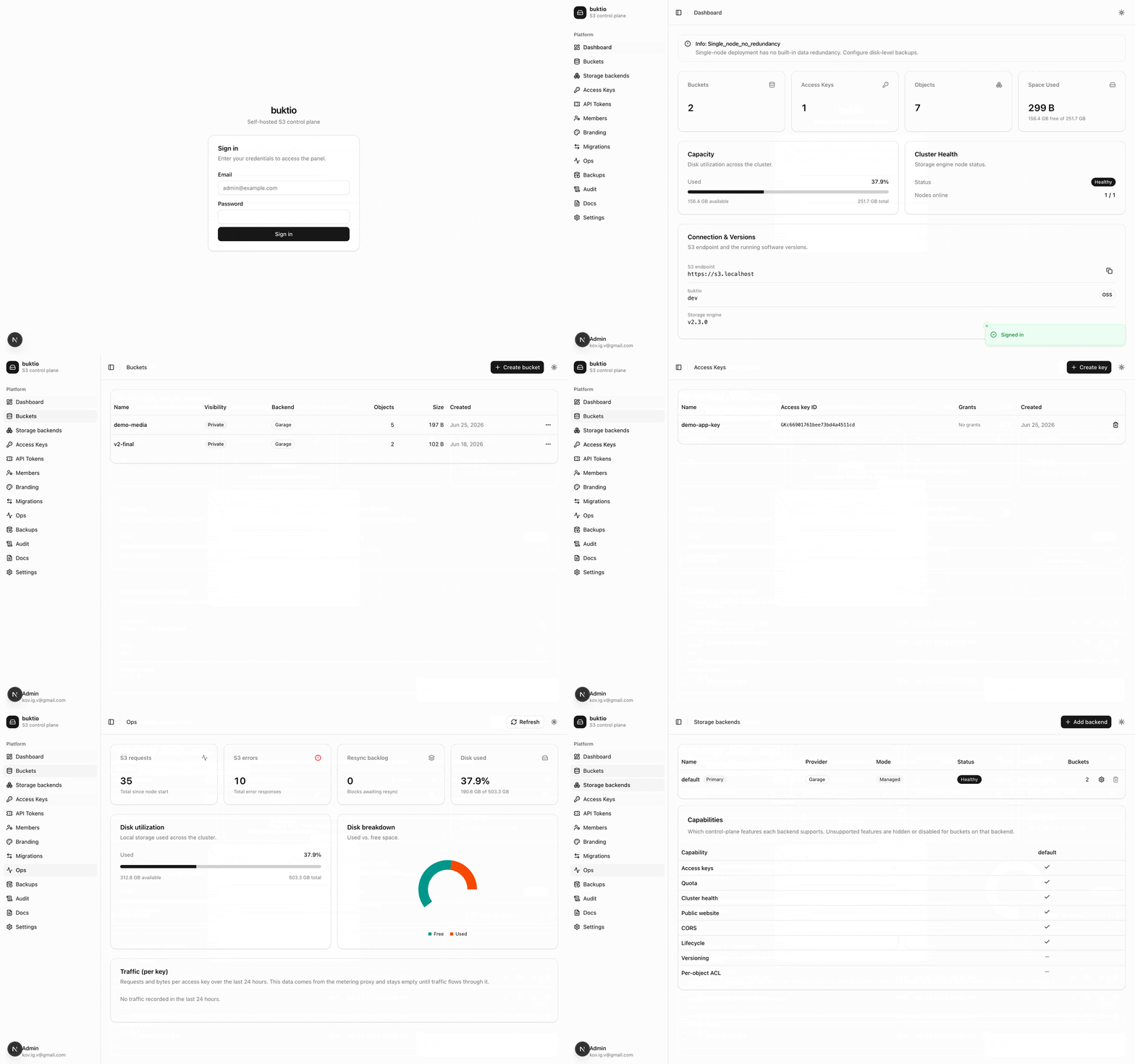
Use the bundled Garage engine, or point buktio at external S3 backends — managed through the same interface.
Honest about gaps: on external backends, control-plane features like key management, quotas, cluster health, and website hosting may be unavailable — buktio reports these capability gaps honestly. Object operations work everywhere.
The free core never gains artificial limits. Paid editions add new capabilities for teams and companies — they never remove something that was free. Licensing is offline, with no phone-home.
There is also a Hosted / SaaS edition we operate: self-serve signup, per-tenant cluster provisioning, usage-based billing (storage GB-month + egress + requests), and resumable S3-to-S3 migration.
A single Docker Compose stack. No external dependencies to install first.
Grab the source from github.com/buktio/buktio.
Everything lives in deploy/docker-compose.
Run docker compose up -d. Panel, API, Garage, Postgres, and Caddy start together.
Visit https://localhost (self-signed TLS in local dev) and finish the first-run wizard to create your admin.
# clone
$ git clone https://github.com/buktio/buktio
$ cd buktio/deploy/docker-compose

# start the whole stack
$ docker compose up -d

# then open the panel and create your admin
$ open https://localhost
# (self-signed cert in local dev — accept it once)